Synthesia.io is an AI video generator on a innovative platform revolutionizing the video creation process through the power of artificial intelligence (AI). With a mission to make video creation accessible to everyone, Synthesia.io offers advanced tools that enable users to generate realistic AI-powered videos with ease.
Synthesis has Text-to-video generation capability with 120+ voices and 140+ avatars. Its platform has 60+ templates for different video styles, it has option to create avatar along with ability of AI scriptwriting.
Synthesia AI Video Generator Use Cases
Synthesia has numerous use cases across various industries and purposes. Some of the prominent ones include:
- Marketing and Advertising: Synthesia enables businesses to create engaging promotional videos, advertisements, and marketing campaigns. These videos can effectively showcase products, services, and brand messages to attract and engage audiences.
- Educational Content: Educational institutions and online learning platforms can utilize Synthesia to develop instructional videos, tutorials, lectures, and course content. These videos can enhance student engagement, facilitate learning, and simplify complex concepts.
- Training and Onboarding: Companies can use Synthesia to create training videos for employee onboarding, skill development, and procedural training. These videos provide consistent and standardized training materials, ensuring employees have access to relevant information and instructions.
- Internal Communications: Synthesia can be utilized for internal communications within organizations, such as sharing company updates, announcements, and reports. These videos can improve communication, foster transparency, and keep employees informed and engaged.
- Social Media Content: Social media influencers, content creators, and brands can leverage Synthesia to produce engaging content for platforms like Instagram, Facebook, Twitter, and LinkedIn. These videos can include tutorials, product reviews, storytelling, and interactive content to captivate and grow their audience.
- Customer Support and FAQs: Businesses can use Synthesia to create instructional videos and FAQs to assist customers with product usage, troubleshooting, and frequently asked questions. These videos can provide visual demonstrations and step-by-step guidance to address customer queries and concerns effectively.
- Entertainment and Storytelling: Synthesia can be used to create entertaining and immersive storytelling experiences through animated videos, interactive narratives, and virtual characters. These videos can captivate audiences and convey engaging stories across various genres and themes.
- Public Relations and Brand Building: Synthesia enables organizations to craft compelling narratives, brand stories, and public relations campaigns. These videos can enhance brand visibility, reputation, and credibility by conveying key messages and values to target audiences.
- Event Promotion and Recap: Synthesia can be employed to promote upcoming events, conferences, webinars, and seminars through engaging video content. Additionally, it can create recap videos to highlight key moments, speakers, and insights from past events, fostering engagement and interest.
- Content Localization: Synthesia facilitates content localization by enabling the creation of videos in multiple languages and regional dialects. This feature allows businesses to reach diverse audiences, expand their global presence, and tailor content to specific markets and demographics.
10 Best features of Synthesia.io vidoe creator
Synthesia is the #1 AI video creation platform that lets you create professional videos in 15 minutes.
Synthesia has an AI script assistant that can automatically generate video scripts for you with Chat GPT-like prompts.
Synthesia has a built-in screen recorder that allows you to record short videos of your screen and add them to your videos.
Synthesia has a media library that gives you access to millions of royalty-free images, videos, icons, shapes, and more.
Synthesia has a music library that offers hundreds of royalty-free soundtracks for your videos. You can also upload your own soundtrack if you want.
Synthesia has over 150 AI avatars and voices that you can choose from to make your videos more diverse and inclusive. You can also create your own AI avatar or clone your own voice.
Synthesia supports over 120 languages and dialects, with natural accents and voices. You can also translate your videos into other languages with just a few clicks.
Synthesia has a commenting feature that lets you get feedback, add comments, and edit your videos in one place. You can also preview your videos before generating them.
Synthesia has a variety of video templates that you can use to create videos for different purposes and platforms. You can also upload your own media elements or import your PowerPoint presentations.
Synthesia is built on the foundations of ethics and security. It is SOC 2 and GDPR compliant, has a trust and safety team, and a content moderation policy.
Explore Synthesia.io Video Creation Plans : Price of the Products
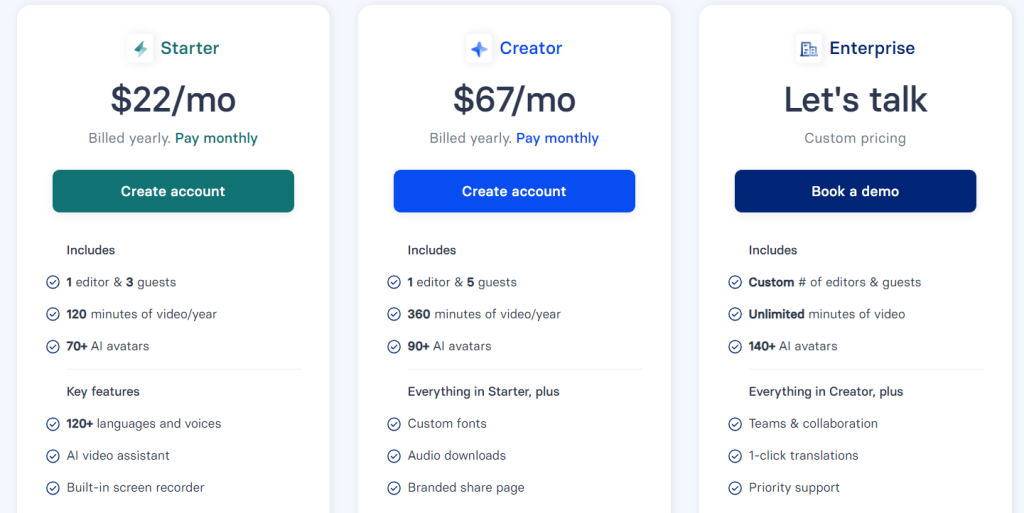
Synthesia.io offers several pricing tiers to suit different needs and budgets. It has range of video creation plans tailored to suit your needs and budget. Whether you’re an individual creator, a growing business, or an enterprise, we have the perfect plan for you.
Starter Plan:
- Price: $22 per month or $264 per year
- Features:
- 120 minutes of video per year
- 70+ AI avatars
- Basic features included
Creator Plan:
- Price: $67 per month or $804 per year
- Features:
- 360 minutes of video per year
- 90+ AI avatars
- Custom fonts
- Branded share page
- Plus more!
Enterprise Plan:
- Custom tailored plan
- Features:
- Unlimited minutes of video
- 140+ AI avatars
- Voice cloning
- Translation
- Teams and collaboration
- Priority support
- And much more!
Choose the plan that best fits your needs and start creating stunning videos today. Whether you’re looking to enhance your personal projects, boost your business, or scale your enterprise, we’re here to support you every step of the way.
Sure, here’s a table with the requested columns:
Synthesia Comparison Table of Plans & Subscriptions with price
Comparison Table of Plans:
| Plan Name | Features | Monthly Price | Annual Price | Website Link |
|---|---|---|---|---|
| Starter | 120 minutes of video, 70+ AI avatars, basic features | $22 | $264 | Website |
| Creator | 360 minutes of video, 90+ AI avatars, custom fonts, branded share page | $67 | $804 | Website |
| Enterprise | Unlimited minutes of video, 140+ AI avatars, voice cloning, translation, teams and collaboration, priority support | Custom | Custom | Website |
Main Products
The main products of Synthesia are:
- AI-Powered Video Generator: Synthesia’s AI-powered video generator allows users to create dynamic videos using text-to-video technology. This product empowers users to generate realistic AI-powered videos effortlessly, making the video creation process accessible to everyone.
- Customizable Avatars: Synthesia offers a range of customizable avatars that users can use to personalize their videos. These avatars allow users to create unique characters and narratives, enhancing the visual appeal and engagement of their videos.
- Professional Templates: Synthesia provides professional templates for various video styles, including marketing videos, educational videos, training videos, and more. These templates streamline the video creation process, allowing users to produce high-quality videos quickly and easily.
- AI Scriptwriting Tool: Synthesia’s AI scriptwriting tool enables users to generate scripts automatically using artificial intelligence. This feature simplifies the scriptwriting process, saving users time and effort while ensuring the quality and coherence of their video content
Pros & Cons
Pros:
- Leading AI technology for realistic video generation.
- Diverse range of avatars and voices for customization.
- Professional templates for various video styles.
- Advanced AI scriptwriting capabilities.
- Flexible pricing plans to accommodate different user needs.
Cons:
- Lack of free stock media limits customization options.
- Limited customization compared to some competitors.
- Higher pricing for professional and enterprise plans.
- Some users may find the learning curve steep initially.
- Free plan offers limited features and capabilities.
Create social media videos with Synthesia’s AI avatar video generator
Here are some additional ideas for social media videos that can be created using Synthesia’s AI avatar video generator, specifically tailored for platforms like Instagram Reels, YouTube Shorts, intros, and more:
- Instagram Reels and TikTok Videos:
- Create short, attention-grabbing videos optimized for platforms like Instagram Reels and TikTok. Use AI avatars to deliver quick tips, fun facts, or entertaining skits in a format that resonates with younger audiences and encourages engagement through likes, comments, and shares.
- YouTube Shorts:
- Produce bite-sized videos for YouTube Shorts, focusing on trending topics, challenges, or quick tutorials. Utilize AI avatars to deliver concise and informative content that captures viewers’ attention and encourages them to subscribe or explore your other content.
- Channel Intros and Outros:
- Design captivating intros and outros for your YouTube channel or other video content. Use AI avatars to introduce your channel, welcome viewers, and provide a preview of what they can expect from your content. Similarly, create outros to encourage viewers to like, comment, and subscribe to your channel for future updates.
- Product Reviews and Recommendations:
- Share product reviews and recommendations through engaging video content. Use AI avatars to present honest and informative reviews of products or services, highlighting key features, benefits, and personal experiences to help viewers make informed purchasing decisions.
- Vlogs and Personal Updates:
- Create vlogs and personal updates to connect with your audience on a more intimate level. Use AI avatars to share behind-the-scenes insights, personal anecdotes, or updates on your life or business journey, fostering a sense of authenticity and relatability with your viewers.
- Educational Series:
- Launch an educational series on platforms like YouTube or IGTV, covering topics relevant to your industry or niche. Use AI avatars to deliver engaging and informative content in a structured series format, providing value to your audience and establishing yourself as a thought leader in your field.
- Interactive Storytelling:
- Experiment with interactive storytelling techniques to keep viewers engaged and entertained. Use AI avatars to create interactive choose-your-own-adventure stories, quizzes, or polls, allowing viewers to participate and shape the narrative in real time.
- Social Media Challenges:
- Join or create social media challenges to spark creativity and engagement among your audience. Use AI avatars to introduce the challenge, explain the rules, and showcase participant submissions, encouraging viewers to join in the fun and share their own creations.
- Holiday and Seasonal Content:
- Develop holiday and seasonal content to coincide with special occasions and events throughout the year. Use AI avatars to create themed videos, promotions, or greetings that resonate with your audience and capitalize on seasonal trends and themes.
- Collaborations and Partnerships:
- Collaborate with influencers, brands, or other content creators to produce collaborative videos. Use AI avatars to represent yourself or your brand in joint projects, promotions, or sponsored content, reaching new audiences and building mutually beneficial partnerships.
Create branded video videos with Synthesia’s AI avatar video generator
Using Synthesia’s AI avatar video generator, you can create a variety of engaging social media videos tailored to different platforms and audience preferences. Here are some examples:
- Branded Content: Develop branded videos that showcase your company’s products, services, or values. Use AI avatars to represent your brand persona and convey your messaging in a personalized and relatable way.
- Promotional Videos: Create promotional videos to advertise upcoming events, sales, or special offers. Use AI avatars to deliver promotional messages and highlight key benefits or features, capturing viewers’ attention and driving engagement.
- Customer Testimonials: Produce customer testimonial videos featuring AI avatars representing satisfied customers or clients. Use text-to-video technology to showcase testimonials in a visually appealing and authentic manner, building trust and credibility with your audience.
- Product Demonstrations: Showcase your products or services with interactive product demonstration videos. Use AI avatars to guide viewers through product features, use cases, and benefits, helping potential customers visualize the value of your offerings.
- Educational Content: Share educational videos on topics relevant to your industry or niche. Use AI avatars to present educational content in an engaging and accessible format, making complex concepts or processes easier to understand and retain.
- How-to Guides: Create how-to videos that provide step-by-step instructions on using your products or services. Use AI avatars to demonstrate tasks or procedures, guiding viewers through each stage with clarity and confidence.
- Behind-the-Scenes Footage: Offer behind-the-scenes glimpses into your company culture, operations, or creative process. Use AI avatars to narrate behind-the-scenes footage, providing insights and perspectives that humanize your brand and foster connections with your audience.
- Interactive Q&A Sessions: Host interactive Q&A sessions with AI avatars answering common questions or addressing customer inquiries. Use text-to-video technology to simulate real-time interactions, providing valuable insights and fostering engagement with your audience.
- Polls and Surveys: Create polls or surveys to gather feedback from your audience. Use AI avatars to present questions or prompts, encouraging viewers to participate and share their opinions, preferences, or experiences.
- Interactive Contests or Challenges: Organize interactive contests or challenges to encourage user participation and engagement. Use AI avatars to introduce contest rules, announce winners, or provide updates, fostering a sense of community and excitement among your audience.
How to create n AI avatar video using Synthesia’s AI video generator
To create an AI avatar video using Synthesia’s AI video generator, follow these steps:
- Sign Up/Login: Go to the Synthesia website and sign up for an account or log in if you already have one.
- Choose Your Avatar: Once logged in, select an avatar from Synthesia’s library. You can choose from a variety of avatars with different appearances and styles.
- Write Your Script: Write the script for your video. This can be any text that you want the avatar to say or act out in the video.
- Customize Your Video: Customize your video by adding background images, changing the avatar’s appearance or voice, and adjusting other settings as desired.
- Generate Your Video: Once you’re satisfied with your script and customization options, click on the “Generate” or “Create Video” button to generate your AI avatar video.
- Download or Share Your Video: After the video has been generated, you can download it to your device or share it directly to social media platforms or other websites.
- Review and Edit (Optional): Review the video to ensure it meets your expectations. If necessary, you can make edits or adjustments using Synthesia’s editing tools.
- Finalize and Publish: Once you’re happy with the video, finalize it and publish it to your desired platform.
By following these steps, you can create AI avatar videos using Synthesia’s AI video generator quickly and easily.
Conclusion
Synthesia.io stands at the forefront of AI-driven video creation, offering powerful tools that simplify the video production process for users of all levels. With its cutting-edge technology, customizable features, and professional templates, Synthesia.io empowers individuals and businesses to create engaging videos with ease. While the platform may have some limitations, its innovative approach and commitment to accessibility make it a standout choice in the ever-evolving landscape of video creation tools.
Frequently asked question about Synthesia.io
Q: What is Synthesia and what can it do?
A: Synthesia is a platform that allows you to create videos from text using AI avatars and voices. You can choose from over 150 AI avatars, customize your layout, add images, videos, logos, and more. You can also use the AI script assistant to help you write your script or import your PowerPoint slides.
Q: How many languages does Synthesia support?
A: Synthesia supports over 120 languages and dialects, with natural accents and voices. You can hear and see your text come to life in any language you want.
Q: How do I select a language, voice, or accent in Synthesia?
A: To select a language, type your text into the script box. Synthesia will automatically detect the language you write in. To preview the default voice and accent, click Play script. Synthesia will match each avatar with the most suitable voice by default. If you want to change the accent, click on the voice selection bar. You can scroll through the list or use the search bar to find the voice you want.
Q: How do I translate my videos into other languages?
A: Synthesia allows you to translate your videos into other languages with just a few clicks. You can access the Add Languages section and browse the list of languages you can translate your video into. Synthesia will automatically generate a new video with the translated text and voice.
Q: How do I fix audio pronunciation issues in Synthesia?
A: Synthesia uses a technology called text-to-speech to read your typed text aloud. Sometimes, the text-to-speech system may have difficulties pronouncing some words correctly. To solve this issue, you can use phonetic spelling or punctuation marks to guide the system. For example, if you want to pronounce “Synthesia” as “sin-thee-zee-uh”, you can type “Synthesia (sin-thee-zee-uh)” or “Synthesia.” in your script. You can also contact Synthesia’s support team for further assistance.